How To Find Clients on LinkedIn in Under 5 Minutes
LinkedIn is the first place many clients go when looking to hire an agency. That means high-quality prospects are on LinkedIn right now looking for someone like you.
But LinkedIn can also be a huge waste of time. Automated messages, spammy connection requests, joining random groups—none of it works.
Here's what does: using LinkedIn's search to find warm leads in minutes.
Why Search Beats Everything Else
Most agencies reach out to cold prospects on LinkedIn. They send hundreds of automated messages hoping some percentage will convert. This "spray and pray" approach gets you ignored and marked as spam.
A better approach: find people who are already looking to hire an agency like yours. These are warm leads—they're in the buying process right now. They've posted asking for referrals or requesting proposals.
LinkedIn's free search makes finding them easy.
Step 1: Choose Your Search Terms
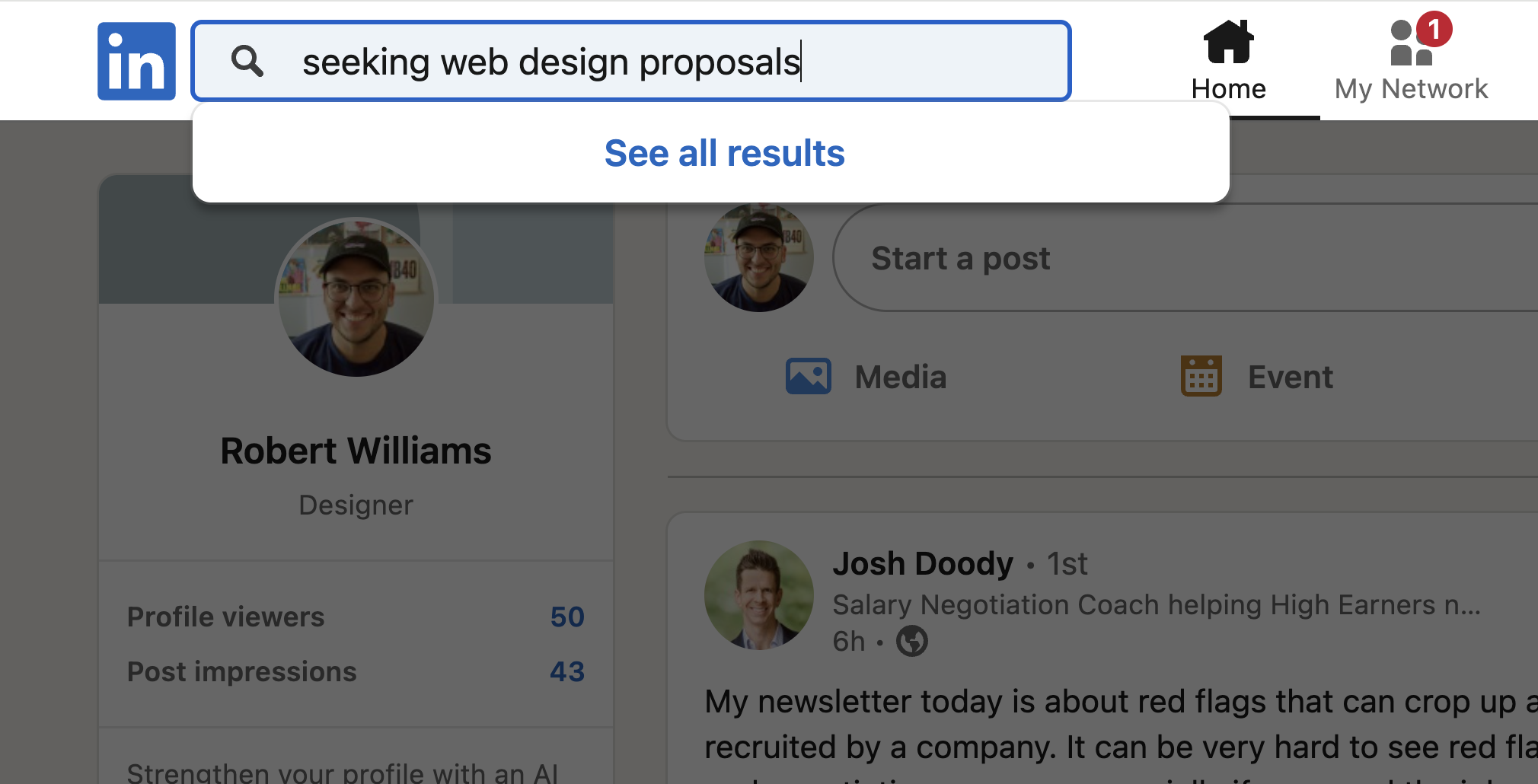
Ask yourself: How would an ideal client word a LinkedIn post if they were looking for referrals or proposals?
Try terms like:
web design agency needed
hiring freelance web developer
website redesign rfp
requesting proposals web development
seeking digital marketing agency
Test different keywords and see what turns up the best prospects. A small business owner will word their posts differently than a nonprofit or enterprise company.
Pro tip: Use LinkedIn's boolean search for more targeted results. For example: "RFP web design" OR "RFP graphic design" NOT "development" expands your results while filtering out irrelevant posts.
Step 2: Filter to Posts (Not People)
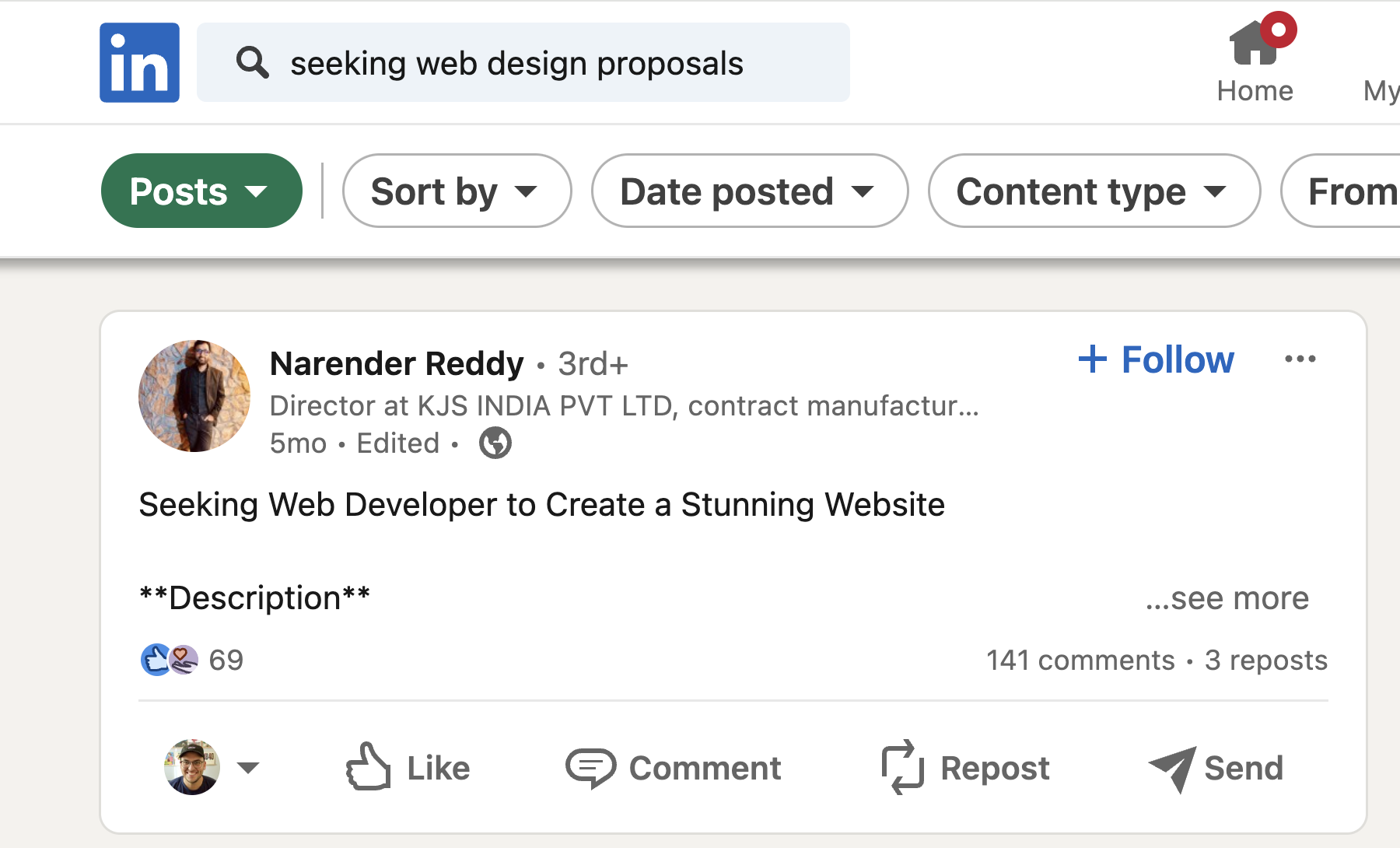
By default, LinkedIn shows search results by people. You want posts.
Click "Posts" in the filter options to see what potential clients are actually posting to their network.
Step 3: Sort by Latest
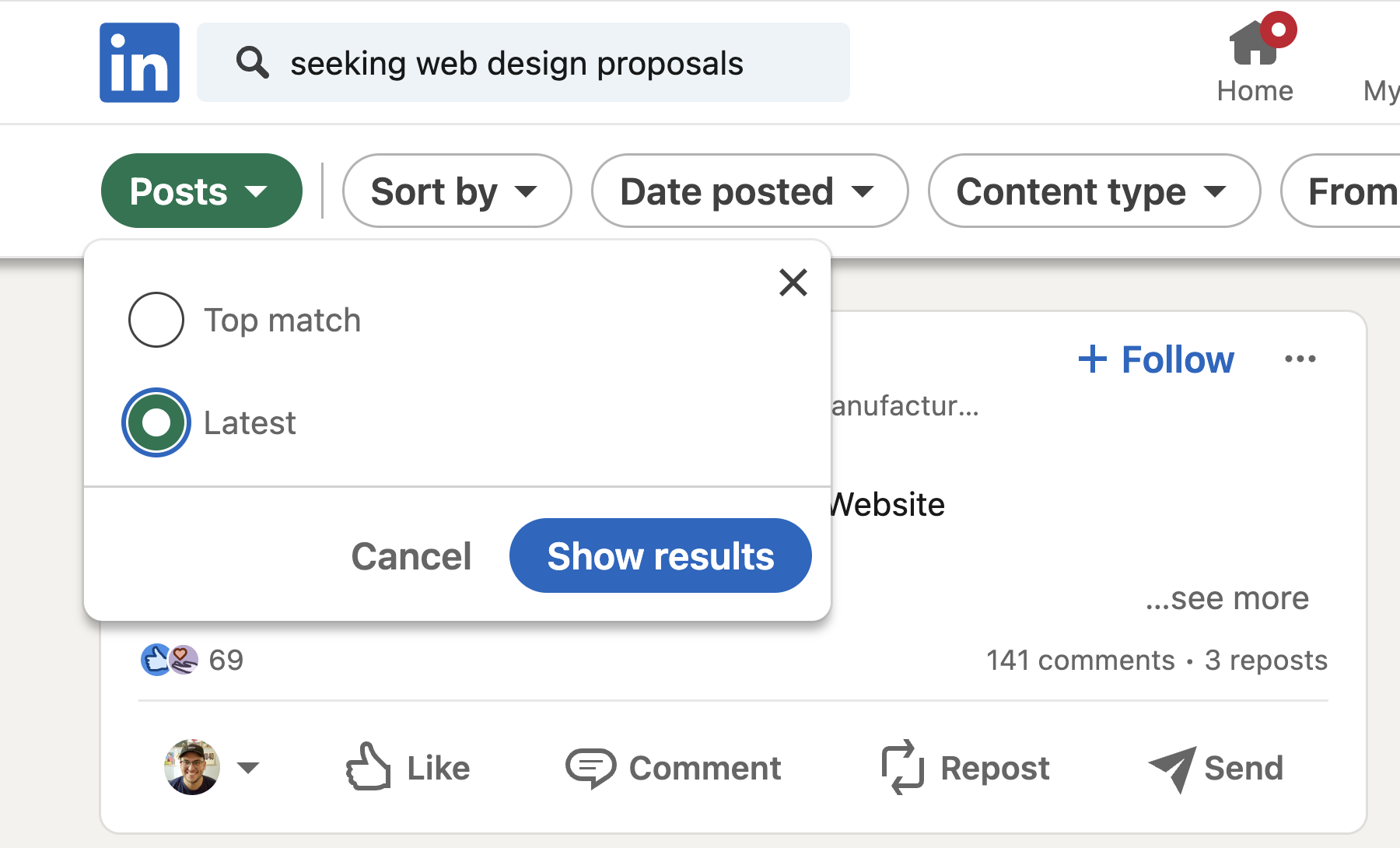
LinkedIn defaults to showing "most relevant" results regardless of date. This often surfaces opportunities from years ago.
Click "Sort by: Latest" to see recent posts—opportunities that are still active.
Step 4: Evaluate What You Find
Not every result is worth pursuing. Here's how to tell the difference:

Good lead signals:
Links to an actual RFP with a real budget
Reputable organization
Decision-maker is posting directly
Deadline gives you enough time to apply
-
Project matches your expertise
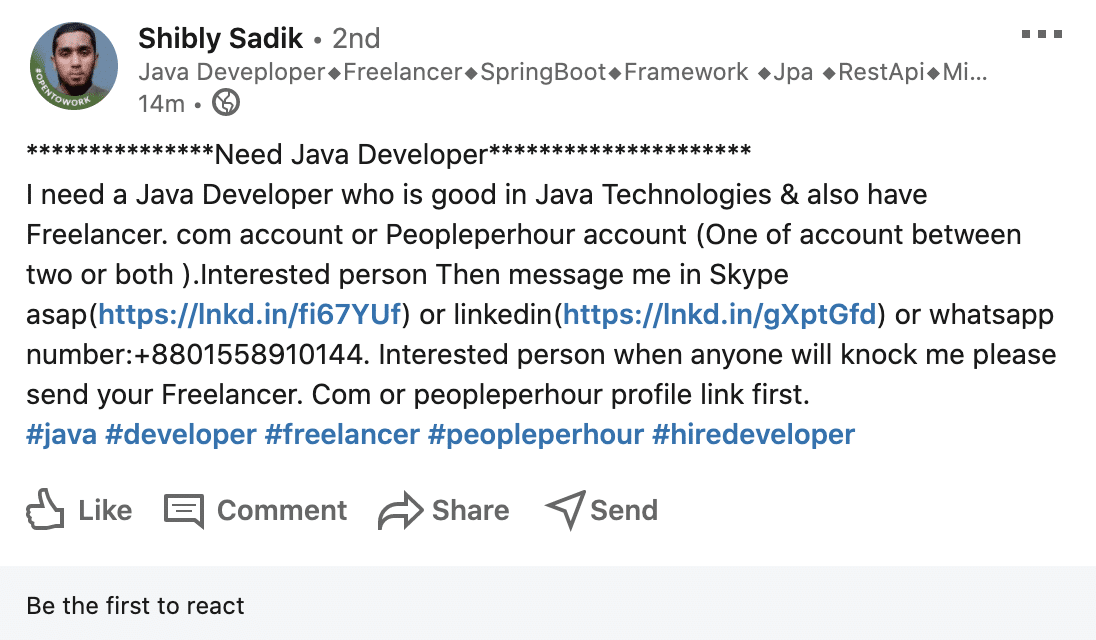
Bad lead signals:
Outside your niche
Mentions low-paying platforms (Fiverr, PeoplePerHour)
Appears to be a freelancer subcontracting
Signs of very low budget
Be selective. When you find a quality opportunity, invest time in it.
Step 5: Reach Out and Make a Good First Impression
Before you message anyone, make sure your LinkedIn profile is ready:
Professional headshot
Company page with your logo
Testimonials in your About section
Headline that speaks to your target market
Examples of your work in your Featured section
Then send a connection request and a direct message. Keep it simple:
"Hi, my web design company is interested in submitting a proposal for your RFP. Do you have any more information you can share?"
This opens a dialogue. You're not pitching—you're starting a conversation.
Step 6: Follow Up
A simple LinkedIn message can set you apart from agencies who just submit a proposal and disappear.
Once you've opened a line of communication, use it. Follow up regularly (not daily—that's annoying). You'll often learn things that aren't in the original post:
When deadlines get extended
The actual budget
Why they're doing the project in the first place
This insider context can be the difference between winning and losing.
Want This Done For You?
This process works, but it takes time—5-10 hours per month if you do it yourself.
Folyo monitors LinkedIn and hundreds of other sources for you. Every week, we send curated website design and development RFPs directly to your inbox—qualified opportunities with real budgets from organizations ready to hire.
By default LinkedIn will show you search results by people, not their posts. To change this click on “More” in the upper navigation and select the “Content” tab.
This will show you posts that potential clients are making to their social network, which is what you want.
Step 3: Sort by Latest To Find More Recent Opportunities
By default, LinkedIn will show you what it thinks is most relevant, regardless of post date.
Often this results in leads that are past the response deadline.
To change this click on the “Sort by:” section in the upper right corner and click Latest.
By sorting by Latest you will make sure that you’re not seeing clients who were looking for exactly what you do in 2013.
Instead, you’ll see the most recent opportunities and stuff that is likely still active.
Step 4: Review Your Results and Find the High-Quality Opportunities
Below are 2 results I found using the terms above.
This is a good lead. I would apply, here’s why:
They link to an RFP (which provides a real budget)
Their organization (Colorado Trust) looks legit and high-quality
Decision-maker is the same person posting on LinkedIn
Job title indicates they have experience managing teams
Deadline gives enough time to apply
Great high-value project (website redesign)
Now let’s take a look at a not-so-good lead.
This is a bad lead. I would skip, here’s why:
Outside of the web design niche
Mentions low-paying website (people per hour)
Looks like another freelancer, so likely sub-contracting which means unlikely to pay well
This person is based in a much lower paying country, also indicating a low budget
You want to have a discernment when it comes to choosing which opportunities to go after.
When you do find a quality opportunity, don’t hesitate.
It’s worth investing a few minutes into finding out as much as you can and seeing if you can make a connection.
Here’s a video walking through how I typically handle private RFPs.
Step 5: Respond to good opportunities and make a good first impression
So you’ve found a perfect-match opportunity, now what?
For all your hard work to pay off, you gotta apply.
Since you’re already on LinkedIn, I recommend contacting them via direct message.
But first, make sure your LinkedIn profile is up to date. Here’s a few quick tips:
Have a good-looking professional headshot. Here’s an example
Create a LinkedIn page for your agency with your logo
Add testimonials to your LinkedIn profile about me section
Speak to your target market and offer a value proposition in your headline
Add examples of your work to your LinkedIn profile
Next, you’re also going to want to send them a new connection request and/or a great cold email. I recommend both.
For some opportunities, a phone call might even be the right next step. Again you’ll want to use discernment when deciding how to approach each lead.
Step 6: Follow Up With New Leads On LinkedIn
Now you might expect a long, detailed proposal to be what wins you the job, but often it’s actually something much simpler.
Yes, you will likely need to send in a proposal to win a job, but a simple LinkedIn message letting the client know you’ve applied can go a long way in building relationships too.
Something like this is perfect:
Hi my web design company is interested in submitting a proposal for your RFP do you have any more information for me?
It doesn’t seem like much, but because you are taking the initiative to send this message to new connections, it can open up a dialogue that will help you stay in touch and build a relationship with the client in the coming weeks.
Once you’ve opened up that line of communication via LinkedIn, use it. Send them valuable content (not spammy messages) and follow up with them regularly.
You can even get additional insider information throughout the RFP process, like when an RFP due date gets extended, a specific budget, and why they are looking to do the project in the first place.
These details may not be included in the initial job post or RFP and can be the difference in winning you the job. This is one of the best LinkedIn strategies and reasons to join LinkedIn there is because you’ll get access to professional network of clients you would’ve never heard about before.
I’ve found this to be a better and more direct marketing strategy for agencies on LinkedIn than using LinkedIn ads or spamming someone’s direct messages.
But it does take time.
Want Your Agency to Monitor LinkedIn on Auto-Pilot?

I get it as an agency owner, your time is valuable. You might consider skipping hours and hours of lead generation on LinkedIn each week and just receive the best, hand-picked RFPs from LinkedIn and elsewhere on the web directly in your inbox.
If you did the entire a step-by-step approach above yourself, you’d be looking at 5-10 hours per month of time spent on LinkedIn. Instead, you can save that time and spend it on the follow up and proposal process instead, with my new done-for-you RFP lead-finding service for agencies.
Free Preview
See This Week's Leads
Last year we sent over 500 RFPs, worth over $37M in project work.
Get a free weekly preview of the latest website design and development projects. Sign up below to see what's available.